RAG pipeline explained: meaning, diagram, and code
A RAG pipeline is the workflow most teams reach for when they want an LLM to answer questions grounded in a specific body of content: your documentation, your internal wiki, a customer’s records, a product catalog. Without one, you’re stuck either hoping the model already knows your domain (it usually doesn’t) or fine-tuning a custom model on your data (expensive and slow). With one, the model becomes useful for specific questions about specific content inside a day or two of engineering work.
I’ve shipped a handful of RAG pipelines over the past year, mostly for internal Q&A tools and customer-facing document search. The first one took me two weeks because I didn’t understand the pieces yet. The most recent one took an afternoon because the pattern, once you’ve seen it, is the same in nearly every project. The differences are in chunking strategy, embedding model choice, and how aggressively you tune retrieval; the skeleton stays consistent.
This post walks through that skeleton from the inside. What a RAG pipeline actually is and means. The diagram you’d draw on a whiteboard to explain it. The code that implements each piece, both in plain Python and using LangChain. The places where I’ve seen real teams trip up. By the end you’ll have enough to build a working RAG pipeline of your own.
Quick answer: what is a RAG pipeline?
A RAG pipeline (retrieval-augmented generation pipeline) is a workflow that retrieves relevant documents from a knowledge base, inserts them into an LLM’s prompt as context, and generates an answer grounded in that retrieved content. The core steps are: ingest and chunk source documents, embed the chunks and store them in a vector database, retrieve the most relevant chunks for an incoming query, build a prompt with those chunks as context, and call the LLM. A working pipeline can be built in Python with LangChain or LlamaIndex in 50-100 lines of code.
RAG pipeline meaning: what it actually is
The “RAG” part stands for retrieval-augmented generation, and the “pipeline” part describes the fact that the work happens in a sequence of stages rather than as a single model call. Put together, the meaning is straightforward: it’s the orchestration layer that lets an LLM use information the model wasn’t trained on.
This matters because the underlying problem RAG solves is a real one. A language model knows what it learned during training and nothing else. If your product launched last month, the model has no idea. If your company’s policies live in a private wiki, the model has never seen them. If a customer is asking about their own order history, the model can’t help unless someone hands it the relevant order data first. The RAG pipeline is the “hand it the relevant data first” part, automated.
Compared to the alternatives, RAG sits in a useful middle ground. Fine-tuning a custom model on your data also works, but it’s slow, expensive, and produces a static snapshot that goes stale the moment your content changes. Just prompting the LLM with all your content directly works for tiny knowledge bases but breaks the moment you have more than a few dozen pages, because context windows aren’t infinite and longer prompts are slower and more expensive. RAG keeps the model itself untouched, stores your content in a searchable index, and pulls in only the chunks relevant to each specific question. The model stays cheap to run, the content stays easy to update, and the answers stay grounded in real data.
RAG pipeline diagram: the architecture in one picture
Most of the confusion about RAG pipelines goes away once you can draw the diagram. Here’s the architecture, in ASCII for portability:
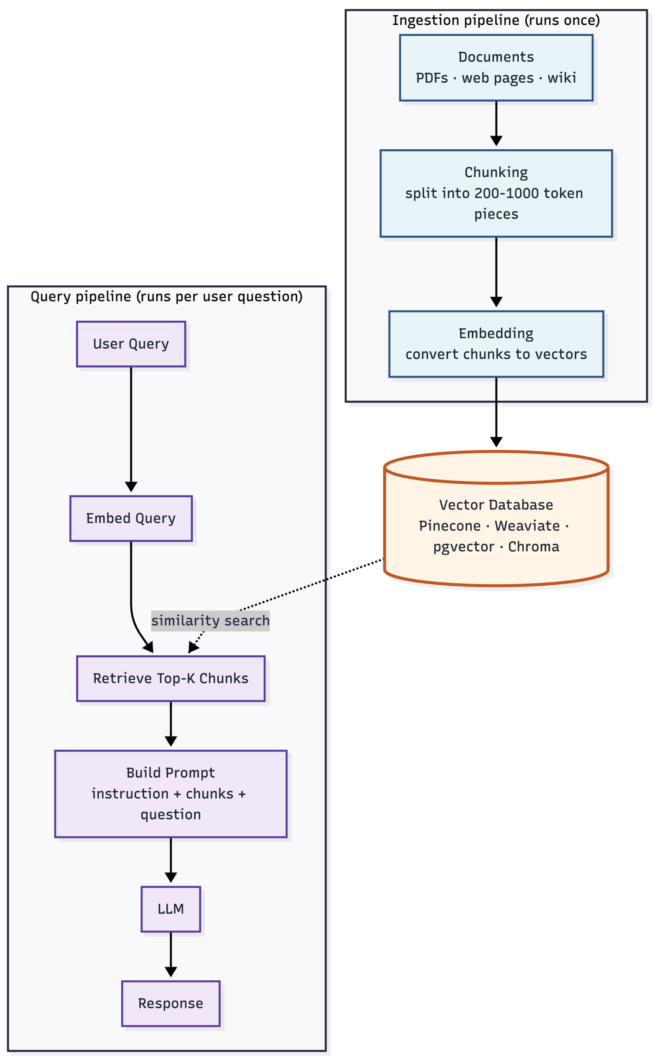
The diagram splits naturally into two halves. The top half is the ingestion pipeline, which runs once when you add or update documents. The bottom half is the query pipeline, which runs every time a user asks a question. Most beginners think of RAG as just the query side and forget that the ingestion side needs equal engineering attention; in practice, the choices you make during ingestion (especially chunking) determine more of your final answer quality than the LLM choice does.
That distinction is also why the diagram is worth memorizing rather than just glancing at. Most production RAG problems trace back to one specific box in this picture. Bad chunking? The vector database stores fragments that don’t carry enough context. Wrong embedding model? Similarity search returns chunks that look related but aren’t. Weak prompt template? The LLM sees the right chunks but doesn’t ground its answer in them. Knowing which box owns which failure mode is most of the debugging work.
How a RAG pipeline works, step by step
Walking through what actually happens during each query makes the diagram concrete.
A user types a question into your app: “What’s our refund policy for damaged items shipped internationally?“ That question is the entry point. Your application takes the raw text and sends it through the same embedding model you used during ingestion. The result is a vector, usually a list of 768 or 1536 floating-point numbers, that represents the semantic meaning of the question in the same space your document chunks already live in.
That query vector then becomes the lookup key for your vector database. The database performs a similarity search (typically cosine similarity or inner product) against every stored chunk and returns the top-K most similar ones. For most use cases, K sits between 3 and 10; smaller K is faster and cheaper but risks missing relevant context, larger K dilutes the prompt with marginally-related material. The right number is one you tune against your specific eval set, not one you pick from a tutorial.
Once you have the retrieved chunks, the next step is constructing the actual prompt the LLM will see. A typical template looks like: a system instruction telling the model what its job is, the user’s question, and the retrieved chunks formatted as context. The order matters more than people expect; instruction first, then context, then question is usually the strongest layout for current models. Whether to include source attribution in the chunks (so the model can cite them) depends on whether your application surfaces citations to the user.
The LLM receives that complete prompt and generates a response. If the chunks contained the relevant information, the response should reference it. If they didn’t, a well-designed prompt template explicitly instructs the model to say “I don’t have enough information to answer that” rather than inventing one. That second behavior is the difference between a useful production system and a confident hallucination machine, and it’s almost entirely controlled by the prompt template rather than the model.
How to build a RAG pipeline in Python
The minimum useful Python implementation runs maybe 50 lines and uses no framework beyond a vector database client and an LLM SDK. Here’s a working example using OpenAI for embeddings and generation, and Chroma as the local vector store:
import chromadb
from openai import OpenAI

client = OpenAI()
db = chromadb.PersistentClient(path="./rag_db")
collection = db.get_or_create_collection("docs")

def ingest(documents: list[str]):
    """Chunk, embed, and store documents."""
    chunks = []
    for doc in documents:
        # Naive chunking by paragraph; production code uses better strategies
        chunks.extend(doc.split("\n\n"))

    embeddings = client.embeddings.create(
        model="text-embedding-3-small",
        input=chunks,
    )

    collection.add(
        ids=[f"chunk-{i}" for i in range(len(chunks))],
        embeddings=[e.embedding for e in embeddings.data],
        documents=chunks,
    )

def query(question: str, top_k: int = 5) -> str:
    """Retrieve relevant chunks and generate an answer."""
    query_embedding = client.embeddings.create(
        model="text-embedding-3-small",
        input=[question],
    ).data[0].embedding

    results = collection.query(
        query_embeddings=[query_embedding],
        n_results=top_k,
    )
    context = "\n\n".join(results["documents"][0])

    response = client.chat.completions.create(
        model="gpt-5",
        messages=[
            {"role": "system", "content": "Answer based on the provided context. If the context doesn't contain the answer, say so."},
            {"role": "user", "content": f"Context:\n{context}\n\nQuestion: {question}"},
        ],
    )
    return response.choices[0].message.content
That’s the whole pipeline. Run ingest(["doc1 text", "doc2 text", ...]) once, then call query("your question") for each user question. The code is intentionally minimal, but the structure is the same as any production system.
The pieces you’d add for production work are predictable. Smarter chunking (recursive character splitter or semantic chunking instead of naive paragraph splits). A persistent vector database with proper indexing (Pinecone, Weaviate, or pgvector instead of Chroma’s local file). Reranking the retrieved chunks with a cross-encoder before passing them to the LLM. Logging and evaluation harness. Caching. Each addition is a discrete improvement; none of them change the fundamental shape of the code above.
Building a RAG pipeline with LangChain
The same pipeline using LangChain is shorter, because LangChain provides higher-level abstractions for each step. The trade-off is more dependencies and a slightly steeper learning curve if you’ve never used the framework.
from langchain_openai import OpenAIEmbeddings, ChatOpenAI
from langchain_community.vectorstores import Chroma
from langchain_core.prompts import ChatPromptTemplate
from langchain_core.runnables import RunnablePassthrough
from langchain_core.output_parsers import StrOutputParser

embeddings = OpenAIEmbeddings(model="text-embedding-3-small")
vectorstore = Chroma(embedding_function=embeddings, persist_directory="./rag_db")
retriever = vectorstore.as_retriever(search_kwargs={"k": 5})

llm = ChatOpenAI(model="gpt-5")
prompt = ChatPromptTemplate.from_messages([
    ("system", "Answer based on the provided context. If the context doesn't contain the answer, say so."),
    ("user", "Context:\n{context}\n\nQuestion: {question}"),
])

def format_docs(docs):
    return "\n\n".join(doc.page_content for doc in docs)

rag_chain = (
    {"context": retriever | format_docs, "question": RunnablePassthrough()}
    | prompt
    | llm
    | StrOutputParser()
)

# Usage
answer = rag_chain.invoke("What's our refund policy?")
Compared to the raw Python version, the LangChain implementation is about half the lines, and the chain composition syntax (retriever | prompt | llm | parser) is genuinely clean once you’re used to it. The cost is dependency weight and the small but real risk that LangChain’s primitives change between versions, which has happened more than once.
For a first RAG pipeline, I usually recommend the raw Python version. The framework abstractions hide too much of what’s happening, and beginners struggle to debug what they can’t see. Once you’ve built a couple of pipelines from scratch and understand each piece, switching to LangChain (or LlamaIndex, which is a credible alternative) makes sense because the abstractions stop being mysterious. They become productivity wins instead.
Common RAG pipeline gotchas
The pattern looks clean in tutorials and breaks in messy specific ways once you put it in front of real users. The failures I’ve seen most often:
Bad chunking is the single biggest source of retrieval problems. Splitting documents on paragraph breaks (like the example above) sounds reasonable and produces chunks that lose context. A sentence referring to “this policy” loses its meaning when the chunk before it (which defined the policy) gets split off. Better chunking strategies (recursive character splitting with overlap, semantic chunking that respects sections, document-aware splitting that keeps related content together) materially improve retrieval quality. The chunking choice usually beats the embedding model choice for end quality.
Embedding model mismatch breaks everything quietly. If you embed your documents with one model and your queries with a different one, similarity search returns nonsense, and you won’t see an error – just irrelevant retrievals. Pick one embedding model, document it, and lock the version. The bigger trap is upgrading the embedding model later: you have to re-embed every document in your store, because the new model’s vectors live in a different geometric space than the old one.
Top-K choice is more important than it looks. Most teams pick K=3 or K=5 from a tutorial and never tune it. For some queries, K=3 is too few and the LLM doesn’t have enough context to answer. For others, K=10 is too many and the prompt gets crowded with marginally-relevant chunks that distract the model. Adaptive K (let the agent or a reranker decide how many chunks to use per query) is the upgrade most production pipelines need eventually.
No evaluation harness means no real iteration. A RAG pipeline can fail in five distinct places (ingestion, chunking, embedding, retrieval, generation), and without an eval set that tests each, you’ll spend weeks tuning things that don’t matter. Build a small eval set (50-100 question-answer pairs) before you start optimizing, and re-run it every time you change something. The teams I’ve seen ship the best RAG systems are the ones that take eval seriously from week one.
When to upgrade to agentic RAG
The basic RAG pipeline described here works for the majority of use cases, but it has a real ceiling. The model gets one retrieval pass per question, the chunks it gets are whatever similarity search returned, and there’s no mechanism for the model to say “this retrieval didn’t help, let me try a different query”. For complex multi-step questions or queries where the right retrieval isn’t obvious, that ceiling gets hit fast.
Agentic RAG is the evolution that addresses this. Instead of a fixed pipeline, an LLM-based agent decides what to retrieve, when to retrieve, and whether the results are good enough before answering. The agent can issue multiple retrievals, reformulate queries, route to different knowledge bases, and verify its own output. The cost is higher per query and the debugging story is more complex, but for accuracy-critical workloads the lift is real.
The honest decision rule: if your eval set shows that single-pass retrieval fails on more than 20% of your hard queries, agentic RAG is worth exploring. If single-pass is hitting 90%+ accuracy, stay simple. Adding agentic complexity to a pipeline that’s already working well usually makes things worse, not better.
FAQ
If you’ve built a RAG pipeline that survived contact with real users and have honest numbers on what broke (chunking strategies that didn’t work, embedding models that quietly failed, retrieval tuning that mattered more than expected), that writeup is worth more than another tutorial. The published material is heavy on the toy version that works in a notebook and light on the messy production version that has to handle real queries from real users.
